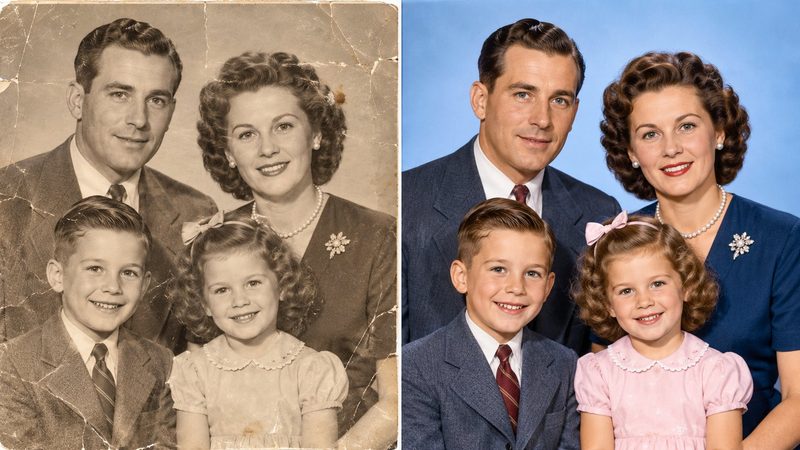
Somewhere in every family there is a box of old black-and-white photos — grandparents as children, weddings from decades ago, a house that no longer stands. Seeing them in colour feels like meeting the people in them for the first time. PixKitTools' Old Photo Colorizer adds colour with AI, free in your browser.
Colorize in 4 steps
- Open the Old Photo Colorizer.
- Upload your black-and-white photo or a scan of one.
- Wait for the AI. The first run downloads the colour model once (about 25 MB) and your browser caches it, so later photos are faster.
- Adjust the colour intensity if you like, then download the colour photo. No signup, no watermark, and your photo is never uploaded.
An honest note about AI colour
The colours are plausible guesses made by the AI — not the photo's original colours. The AI knows skies are usually blue and grass is usually green, but it cannot know what colour someone's dress actually was. Skin tones are the hardest part: keep the intensity lower for realistic faces, and raise it for bolder landscapes and clothing. If a face looks odd, lower the intensity before anything else.
Tips for the best result
- Scan properly. A 300 DPI scan of the print beats a phone photo of the print — glare and tilt ruin colouring.
- Clean the scan first. Dust, scratches and stains confuse the AI. A quick crop and a wipe of the print help more than any setting.
- Good light, good colour. Bright, clear originals colourise far better than dark, faded or blurry ones.
- Try twice. The same photo at two intensity levels often gives two very different results — pick the one that feels right.
Is it really free?
Yes. All 22 PixKitTools tools are free with no signup, no watermark and no daily limit, and everything runs in your browser.